





You can tell an ad is fatigued when three numbers worsen at the same time: the number of times it is shown to the same person rises, the click-through rate falls and the cost per result goes up. If all three appear together in a single ad while the new ads in the same ad set are performing normally, the problem is that the image or video has gone stale. Results worsening week after week even though the audience, the offer and the site have not changed is the most typical form of this picture.
On Meta, every drop tends to be put down to this cause, yet there are other problems that look similar, and their solutions are different. Below we explain exactly what creative fatigue is, which numbers to look at and in what order, how to tell it apart from other problems and what to put in place of a fatigued ad.
What Is Creative Fatigue?
Someone who sees an ad for the first time stops and looks. The third time they see it, they recognise it; the fifth time, they scroll past. The ad stays the same, but it becomes invisible in the viewer's eyes. In marketing this is also called ad fatigue.
The effect on cost is indirect. Meta estimates how much interest an ad will attract and charges a higher price to show an ad that attracts no interest. As people start scrolling past the ad, this estimate falls; reaching the same audience becomes more expensive. Fewer people click, what you pay per click rises and eventually the cost per sale goes up. The quality, engagement rate and conversion rate rankings in Ads Manager show where your ad stands against ads competing for the same audience; in a fatigued ad, a decline in these rankings sends the same signal.
How quickly fatigue sets in depends on the size of the audience. An ad shown to a remarketing audience of a few thousand people can go stale within days; in a broad audience of millions, the same ad can work for months. The period also shortens as spend increases, because the same people are reached faster.
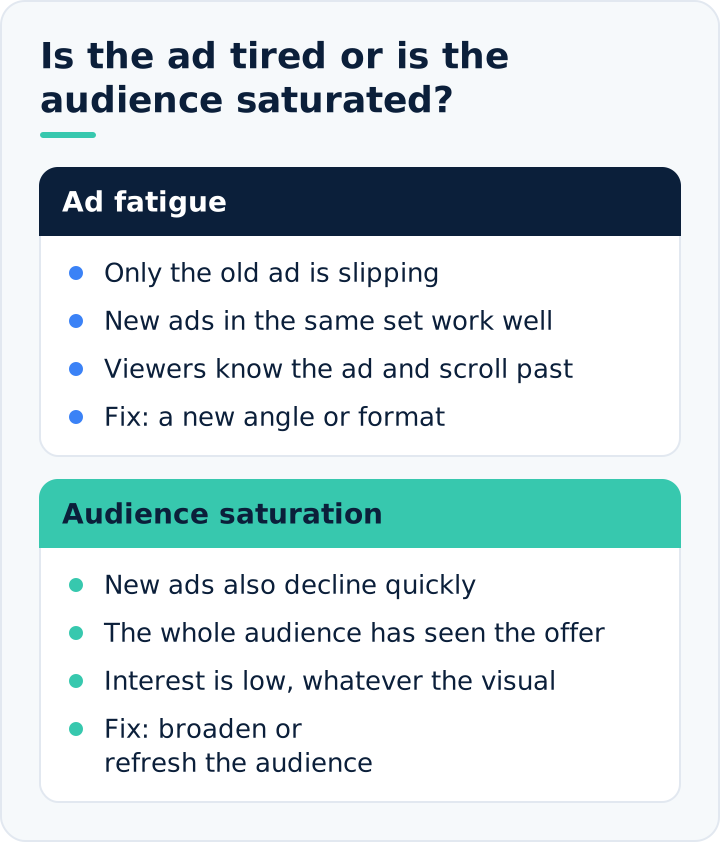
Ad fatigue and audience saturation are not the same thing
The two situations are often confused. When an ad is fatigued, putting in a new one fixes the results. When an audience is saturated, however, everyone in that group has seen your brand and your offer many times; whatever image you put in, interest stays limited. What is needed in this case is not a new image but a new audience. This second situation is known as audience saturation and mostly occurs in small or narrowly targeted audiences.
In Which Campaigns Does It Appear Faster?
- Remarketing campaigns. People who have visited the site or added to cart are a small group. The same ad is shown to them many times within days.
- Narrow targeting. When a single district, a narrow age range or a very specific interest is chosen, the number of people who can be reached is small.
- Periods of heavy spend in a short time. During campaign weeks, spend multiplies several times over, and the repetition that would normally build up over a month builds up in a few days.
- Sets running with a single ad. If there is no other ad in the set to rotate with, the whole load falls on a single image.
In these campaigns you need to look at the numbers more often and keep a backup ad ready from the start.
Four Signs of Fatigue
1. Frequency is rising
Frequency shows how many times, on average, a person saw the ad in the period you selected. It is the number of impressions divided by the number of people reached; as impressions grow while reach stays the same, frequency rises. There is no single limit that applies to everyone; it varies with your product, your audience and the campaign's objective. While even a low frequency is enough in a broad audience that does not know you, a higher frequency is normal in a remarketing audience. What matters is not the number itself but its direction: if frequency is rising week after week and results are worsening at the same time, the sign is clear.
2. Click-through rate is falling
Look at what share of the people who saw the ad clicked the link. If the same ad's click-through rate falls for several weeks in a row, viewers have recognised the ad and lost interest. The benchmark here is the ad's own history; compare it with its previous week, not with other ads. In Meta reports this metric appears as link click-through rate; it is a cleaner signal than the overall click-through rate, which counts all clicks, such as on the profile, likes or comments.
3. Impression and result costs are rising
If the cost per thousand impressions is rising only in that ad and staying flat across the rest of the account, the system is asking for more to show that ad. This is followed by a rise in the cost per sale or per inquiry.
4. Drop-off in the first seconds of video is growing
In video ads, look at what share of viewers get past the first few seconds. If this rate is falling, the video no longer catches attention. Comments such as "this ad again?" or a rise in the number of people hiding the ad say the same thing.
None of these signs proves anything on its own. To make a decision, at least two of them need to appear together, preferably a rise in frequency and a drop in click-through rate.
How Should You Look at the Numbers?
The average at campaign or ad set level hides the fatigued ad, because new ads pull the average up. Open the report at ad level and split the data by week. Looking at a single week is misleading; to see the direction, you need to put three or four weeks side by side.
In the table below you can see in one place what to compare each sign with in your weekly report and which way it moves once creative fatigue sets in:
| Sign | Compared with | Direction under fatigue |
|---|---|---|
| Frequency | The same ad's previous weeks | Rises week after week |
| Link click-through rate | The same ad's previous weeks | Falls several weeks in a row |
| Cost per thousand impressions | Other ads in the account | Rises only in this ad |
| Cost per result | Your cost limit | Rises after the other signs |
| First seconds of the video | The same video's previous weeks | Share of viewers getting past the first seconds falls |
Example: suppose an ad was shown an average of 1.4 times per person in its first week, 1.8 percent of those who saw it clicked, and each sale cost 180 TL. In the fourth week the same ad is being shown 3.6 times per person, the click-through rate has dropped to 0.9 percent and the cost per sale has risen to 290 TL. The audience, spend and site are the same. This picture leaves no room for debate; the ad needs to be refreshed.
In the Meta dashboard, a fatigue warning also appears from time to time in the ad's delivery status. The warning is useful, but it comes late; the numbers usually start to worsen before it. A habit of weekly review is more reliable than waiting for the warning.
Situations That Look Like Fatigue but Are Something Else
A wrong diagnosis leads to the wrong remedy. Switching off a well-performing ad because results have dropped not only fails to solve the problem but also takes away the strongest material you have. Tell these situations apart:
- If impression costs rose across all ads at the same time, the cause is not the ad but the period. In weeks when everyone is advertising, such as November, the whole account gets more expensive.
- If click-through rate is unchanged but the purchase rate is low, the problem comes after the ad: price, stock, shipping terms or the site. The ad is doing its job; the site is not.
- If clicks are unchanged but the sales shown in the dashboard dropped within a single day, the measurement may be broken. Compare the dashboard with your own order records.
- If new ads are also worsening just as fast, the audience is saturated. A new image does well for a few days, then drops to the same place.
- If the drop started right after a major change to the campaign, the system is relearning; you need to wait a few days.
We set out the general order to follow when tracing the source of a drop in our article on what to do when performance drops. The rule here is short: if click-through rate falls while frequency rises and the new ads in the same set are doing well, it is the ad that is fatigued.
What Should You Do with a Fatigued Ad?
Do not switch it off straight away
If its cost is still below your limit, leave the ad running and add new ones alongside it. The system will shift spend to the better performer on its own. You switch off the old ad once the new ones have taken its place. Switching it off with nothing to replace it makes sales drop all at once.
Bring a new idea instead of a small tweak
Changing the background colour or moving the text elsewhere is still the same ad in the viewer's eyes and buys you a few days at most. There are four levels of refresh, and their impact increases in order:
- New opening: changing the first three seconds of the video or the main element of the image.
- New format: telling the same message with a video instead of a photo, or with a carousel instead of a video.
- New angle: highlighting another benefit of the product, another moment of use or another customer objection.
- New offer: a different bundle, a different promotion or a different product.
Increase variety
When a set contains several genuinely different ads, the system rotates them and none of them wears out on its own. This approach is called creative diversity. Variety should also extend to format. Vertical video looks more natural in placements that show short videos and stories; square or horizontal images look more natural in the main feed. Settling for a single format means leaving part of the placements where your ad could be shown empty.
Rest it and reuse it
An ad that has worked well is not finished for ever. After being switched off for a few months, it both reaches new people and has been forgotten by those who saw it before. Keep your best ads in an archive and bring them back from time to time.
Broaden the audience
If ads fatigue very quickly, the audience is small relative to your spend. Broadening the targeting, excluding recent buyers from the audience and shortening the remarketing audience's time window extend the life of the same ad.
How Should You Plan New Ads?
The real way to deal with fatigue is not to rush around after an ad has fatigued, but to have the next one ready and waiting. That requires a regular production habit.
Your source of ideas is your customer. Phrases that recur in reviews, questions that reach customer service, hesitations voiced before purchase and the product's real moments of use give you the best ad angles. You can test each angle in several formats: a person using the product, a close-up of the product, a customer review, an unboxing moment, a comparison of two options.
Produce in batches. Twelve different videos from one shoot day a month cost less than videos produced one by one each week, and you always have backups on hand. How many ads you will need depends on your spend; as spend grows, so does how often you need to refresh.
Name your ads consistently: include the date, angle and format in the name. Only then can you see, three months later, which angle lasted longer in which format. In our Meta ads management work, we keep the content calendar and the campaign calendar together, so the new ad is already lined up before the old one fatigues.
How Often Should You Refresh?
There is no ready-made schedule for this; the answer lies in your own account's history. Take the ads you spent most on over the last six months and check how many weeks each stayed below your cost limit. The average period that comes out is the lifespan of an ad for you.
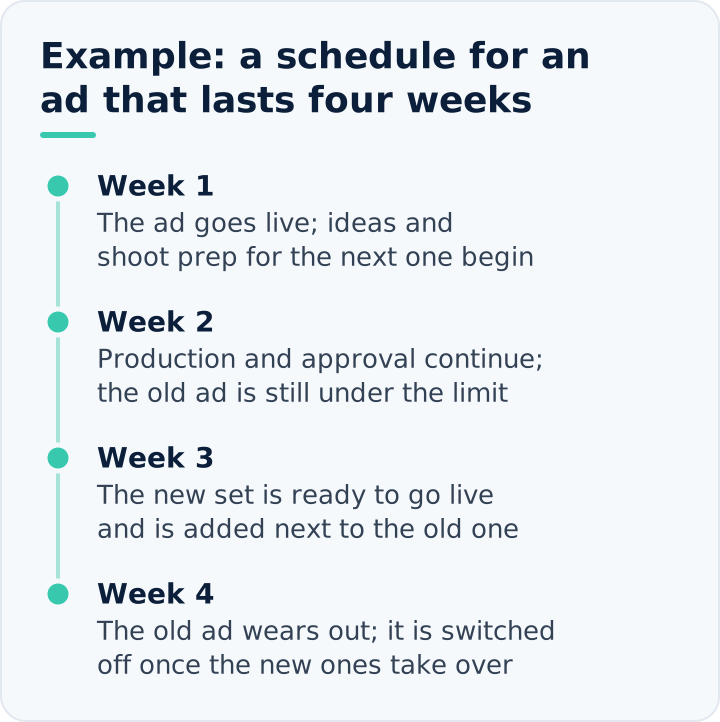
Example: if your ads perform well for four weeks on average and then deteriorate, the new batch needs to be ready to go live in the third week. If production, approval and shooting take two weeks, the date to start discussing new ideas is the first week the ad goes live. Because most businesses do not do this calculation, they make the refresh decision after the numbers have worsened and make expensive sales in the weeks in between.
Things to Watch When Testing a New Ad
- Do not decide within a day. The new ad needs to reach enough people. The numbers in the first days are often volatile.
- Change one main thing per test. If you change the angle, the format and the offer at the same time, you cannot learn which one made the difference.
- Do not put too many ads in one set. When spend is split across dozens of ads, none of them is shown enough.
- Keep the winner as the benchmark. Your best-performing ad is the bar the new ones have to clear.
- Write down what you learn. A note such as "customer review videos last longer than product shots" guides the next shoot.
Weekly Checklist
- At ad level, open the last four weeks split by week: frequency, click-through rate, impression cost, cost per result.
- Flag the ads whose frequency has risen and whose click-through rate has fallen for two weeks in a row.
- Check whether the same deterioration is across the whole account or only in these ads.
- Check whether anything has changed on the site, in pricing or in stock.
- For each flagged ad, prepare a new angle or format and add it alongside the old one.
- Once the new ads have been shown enough, switch off the weakest.
- Note how long each angle lasted.
We explained why Meta is the first channel for products people buy by sight in our Google Ads vs Meta comparison; in that channel, what determines results most is the ad itself. If you want to see how often your ads need refreshing, our performance marketing team will work out the lifespan of the ads in your account and propose a production schedule.
Frequently Asked Questions About Creative Fatigue in Meta Ads
Are ad blindness and creative fatigue the same thing?
No. Ad blindness is users' general habit of ignoring areas that look like ads; creative fatigue is a specific ad losing its effect by being shown too often to the same people. One is about the ad's form, the other about its repetition. Ads that sit in the feed like content and get to the point in the first second reduce blindness, while regular refreshes reduce fatigue.
How do you cap frequency in Meta ads?
Setting a direct frequency cap is only possible in some reach-objective campaign types; in sales or inquiry campaigns, frequency is determined by the size of the audience, the spend and the variety of ads in the set. In these campaigns, the way to lower frequency is to broaden the audience, exclude buyers from the audience or bring spend down to a level the audience can carry.
Is it better to delete a fatigued ad or pause it?
Pausing is better. A paused ad stays in the account along with its likes and comments; after resting it you can switch it back on, or keep the accumulated engagement by using the same post in a new ad. The history showing how many weeks each ad lasted is also the basis for the next production plan.
Do dynamic creative and Advantage+ options prevent fatigue?
They do not prevent it entirely, but they can delay it. Because the system builds and shows different combinations of the images, headlines and text you provide, the number of times the same combination repeats goes down. Even so, if all the pieces are derived from the same idea, viewers will not notice the difference; automatic combinations do not solve fatigue that calls for a new angle or offer.
Does creative fatigue also happen in Google Ads?
Yes, particularly in image- and video-heavy campaigns: the visuals in YouTube, Display Network, Demand Gen and Performance Max campaigns wear out as they are shown to the same people again and again. In search ads, because people see the ad at the moment they are searching for something they need, the same text usually goes stale more slowly; in campaigns shown to a narrow remarketing list, however, the same symptoms can appear.