





For every visitor who adds a product to the cart and leaves without paying, you have already paid for the ad. The cost of the click is the same whether the person buys or not. That is why the share of carts that turn into orders directly determines how much an order costs you: if 35 out of a hundred carts are completed instead of 25, you get 40 percent more orders for the same spend.
When cost per order rises, most businesses look at the ads first: they change the audience, refresh the visuals, adjust the bid. Yet most of the loss often happens after the ad, between the cart and the payment, and fixing that point is cheaper than buying new visitors. Below, we walk through this calculation, why carts are left unfinished, the fixes to make at the payment step and the ways to win back customers who leave.
How Does an Abandoned Cart Show Up in Your Advertising Numbers?
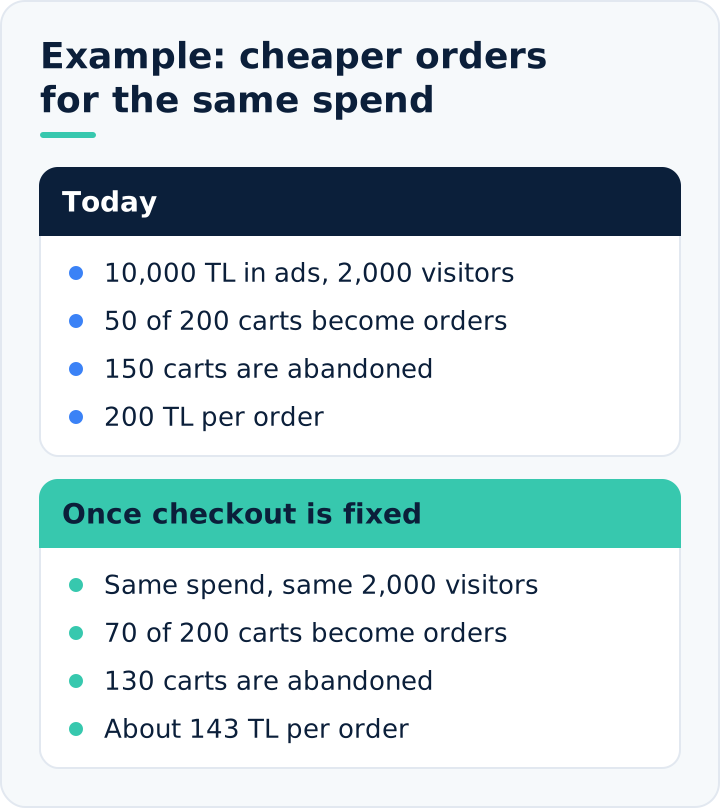
Example: in one month you spent 10,000 TL on ads and paid 5 TL per click; 2,000 visitors came to your site. Of these, 200 added a product to the cart, and 50 of those carts turned into orders. Each order cost you 200 TL.
Now imagine you change nothing in your ads and improve only the payment step. Of the same 200 carts, 70 are completed instead of 50. Same spend, same visitors; cost per order drops from 200 TL to roughly 143 TL.
If you wanted to reach the same result through advertising, the math would look like this: at the old rate, 70 orders would need 280 carts, and 280 carts would need 2,800 visitors, meaning 14,000 TL. The improvement at the payment step does, at no cost, the job of 4,000 TL of extra ad spend every month. What is more, once this gain is achieved, it applies to all your campaigns.
The reverse is also true. When an error appears on the checkout page or the shipping fee goes up, cost per order rises even though nothing has changed in the ad dashboard. That is why cart abandonment is not just a website problem; it is a direct advertising cost item.
There is one more effect, and it is less noticeable. Advertising systems learn whom to show ads to from purchase data. If most carts are left unfinished, fewer purchase signals reach the system and the campaign is slower to find the right people. Loss at the payment step lowers not only today's orders but also the campaign's accuracy tomorrow.
Not Every Abandoned Cart Is a Loss
Expecting every product added to the cart to be purchased is not realistic. Some visitors use the cart like a shopping list, some add items just to see the shipping fee, and some are comparing with other sites. Some of these people will not buy that day no matter what you do. Explaining every abandoned cart with the same reason, however, leads you to fix the wrong thing.
That is why those who leave should be split into two groups:
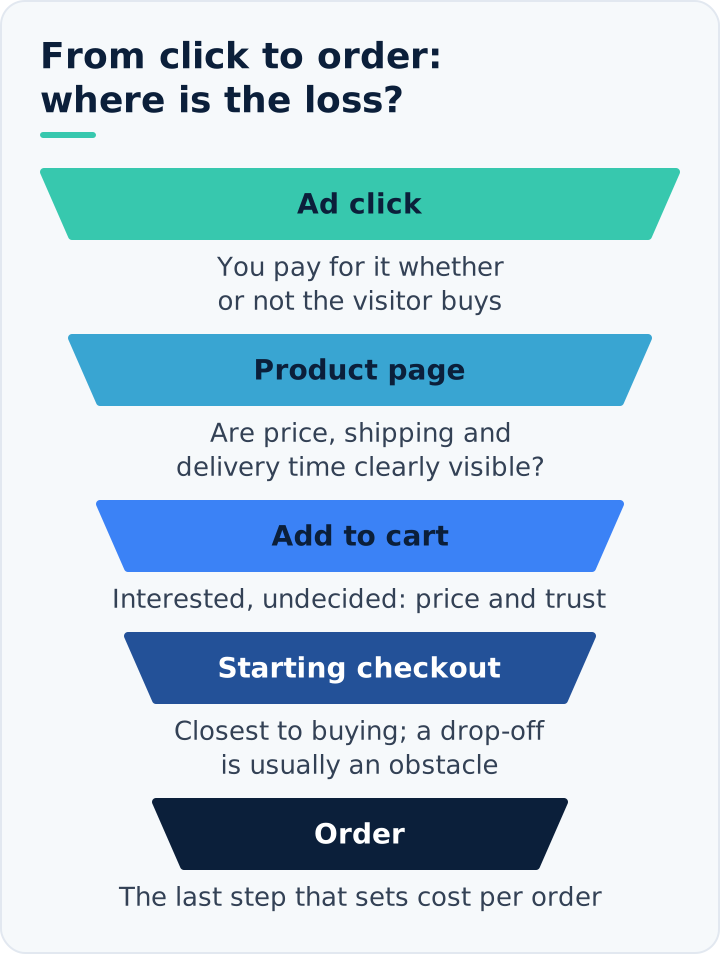
- Those who add to the cart but never start checkout. There is interest, but no decision has been made yet. For this group, price, product information and trust are decisive.
- Those who start checkout and abandon it halfway. A person who has started entering an address or card details is the closest to buying. The loss at this step usually comes from an obstacle: an unexpected fee, a payment method that does not work, a long form.
Start your fixes with the second group. Every person lost there is a customer who has decided to buy, and they can often be won back by removing a single obstacle.
The Main Reasons Carts Are Left Unfinished
- An extra fee that appears at the last step. A shipping cost or service fee not shown on the product page is the most common factor that makes people give up when they see it on the payment screen.
- Mandatory sign-up. A person who has to open an account, set a password and verify an email address just to shop often does not bother.
- A long, confusing form. Unnecessary fields, boxes that are hard to fill in on a phone and error messages that make no sense wear down patience.
- A missing payment option. If there is no instalment option, no cash on delivery or no payment method the person is used to, the order ends there.
- Lack of trust. A person seeing the brand for the first time looks for return terms, contact details and other customers' reviews; if they cannot find them, they do not enter their card details.
- Unclear delivery time. A person who does not know when the product will arrive gives up, especially if they are buying it as a gift or for an urgent need.
- The coupon box. A conspicuous "discount code" field sends people without a code off the site to look for one; many of them do not come back.
- Technical errors. A card verification whose confirmation code never arrives, a page that freezes or a product in the cart going out of stock brings down the order at the last moment.
Shipping Fees and the Free Shipping Threshold
Shipping is the most common of the extra fees, and the solution is often not to remove the fee but to show it in the right place. In a store that states the shipping cost on the product page, the visitor already knows the total when adding to the cart; they are not surprised on the payment screen.
A free shipping threshold both reduces loss and grows the basket. Set the threshold slightly above your average order value. Example: if your average order is 900 TL, setting the threshold at 1,000 or 1,100 TL leads a significant share of customers to add one more product. A line on the cart page such as "Add 150 TL more for free shipping" makes this behaviour visible. If you set the threshold far above the average, nobody tries to reach it; if you set it below, you take on the shipping cost for nothing.
The Ad Itself Also Affects Whether Carts Are Completed
Not all of the problem lies on the site. Who the ad is shown to, and with what promise, determines from the start how many of those who add to the cart will buy.
The promise in the ad versus the reality in the cart
If the ad says "free shipping" or shows a specific price and the visitor sees a different amount in the cart, they leave. Campaign terms, minimum thresholds and the shipping fee should be clearly visible in the ad or, at the latest, on the product page.
A campaign optimising for the wrong goal
Advertising systems grow whatever goal they are given. If the goal is set to "add to cart", the system becomes skilled at finding people who add to the cart but do not buy. The number of carts goes up, orders do not. Once enough sales data has built up, the goal should be purchases.
A broad, uninterested audience
An ad that reaches people with no real need for the product brings visitors who click out of curiosity, add to the cart and leave. Viewed campaign by campaign, a source with a high add-to-cart rate and a low purchase rate reveals this problem. The way to separate ad-driven cart abandonment from site-driven abandonment is to compare the rates campaign by campaign. For all cases where clicks come in but sales do not, we have prepared a separate checklist.
Fixes to Make at the Payment Step
Most of the fixes below do not require major software work; their effect, however, is lasting. The aim of this work, known as checkout page improvement or checkout optimisation, is to remove the obstacles in front of a person who has decided to buy.
- Show the total amount early. State the shipping fee and, if you have one, the free shipping threshold on the product page and in the cart. The earlier the surprise ends, the smaller the loss.
- Allow guest checkout. Leave account creation until after the order.
- Shorten the form. Remove every field not needed for delivery; small details such as the number keypad opening on phones make a difference.
- Broaden your payment options. Add the method your customers ask about most often and show instalment information on the product page.
- Place trust information next to the payment button. The return period, secure payment information and a reachable contact channel should be visible right at that point.
- Move the coupon field into the background. Use a small link such as "I have a discount code" instead of an open box.
- Place an order with your own phone. Placing a real order from start to finish once a month, on mobile data, reveals most errors before the reports do.
If your platform does not allow these changes, the problem runs deeper; in our e-commerce website setup work, we build the payment flow from the ground up on these principles.
Winning Back Customers Who Leave
Even with the best checkout page, some carts are left unfinished. Reaching these people again is much cheaper than finding new visitors from scratch, because they have already chosen the product and come close to buying. This work, known as abandoned cart recovery or cart recovery, has two routes: reminder messages and remarketing ads.
Reminder messages
Reminding a customer who has given contact consent about their cart by email or message is the lowest-cost method. The message should be short, show the product in the cart and take the person back to their cart in one click. Timing matters: interest is highest in the first hours and drops quickly as the days pass. In our Karum Rouge case study, we shared what share of reminded carts turned into orders; more than half of the orders attributed to reminders came within the first 24 hours.
A good reminder message includes the following:
- The name and image of the product in the cart; the person should immediately remember what they left behind.
- A single link that leads straight to the cart.
- A reachable contact route for anyone who wants to ask a question. Behind some abandoned carts lies a question that went unanswered.
- Stock or campaign deadline information, if it is true. Do not create false urgency; it damages trust.
Remarketing ads
The second route is to show dedicated ads to people who added a product to the cart but did not buy. This method is also called retargeting. Pay attention to three rules here. Exclude those who have already purchased from the audience; otherwise you will keep showing ads for the same product to a customer who has just placed an order. Limit the duration according to how long customers take to decide on your product; there is no point showing ads for a T-shirt added to the cart a month ago. Do not appear to the same person many times a day; persistence is irritating.
Should you offer a discount in the reminder?
Offering a discount in the first reminder is often unnecessary. Some people simply forgot or got caught up in something else, and a reminder is enough. A store that sends a discount to every abandoned cart teaches its customers to abandon carts on purpose. Save the discount for those who do not respond to the first message and for high-value carts. We calculated the effect of discounts on earnings in our article on profitability.
Treat High-Value Carts Differently
A T-shirt and a sofa set are not bought at the same speed. As the amount rises, people think longer, consult a spouse or business partner and compare with other stores. For these products it is normal for the cart to wait a few days, and a pushy message in the first hour can backfire.
For high-value products, three things work better: clearly showing instalment options on the product page, offering a phone or messaging line where people can ask their question straight away, and making sure the cart is still there when they return days later. Spread reminders over a longer period, too; highlight product information in the first message and return and delivery terms in the next.
Which Figures Should You Track From Cart to Order?
A single "conversion rate" figure does not show where the problem is. Track the path step by step:
- What share of those who view the product page add to the cart?
- What share of those who add to the cart start checkout?
- What share of those who start checkout complete the order?
Also break these three rates down by device and traffic source. If the completion rate of those who start checkout on mobile is markedly lower than on desktop, the problem is on the mobile payment screen. If completion is low across all sources, the problem is on the site; if it is low in only one campaign, it lies in that campaign's audience or promise.
The table below matches where the loss appears with the likely cause and the first fix to make. The cause is not always a single one; the table shows you where to start.
| Where the loss appears | Possible cause | First fix to make |
|---|---|---|
| Few move from the product page to the cart | Price, shipping cost or delivery time is unclear | Show the total amount and delivery time on the product page |
| Few move from the cart to checkout | Mandatory sign-up or a conspicuous coupon box | Enable guest checkout and turn the coupon field into a small link |
| Many start checkout but do not finish | Long form, missing payment option or card verification error | Shorten the form and test the payment options and verification step yourself |
| Loss only on mobile | A form that is hard to fill in on a phone or a mobile-specific error | Place a real order from your own phone, on mobile data |
| Loss only in one campaign | The promise in the ad does not match the amount in the cart, or the audience is uninterested | Review that campaign's copy, offer and audience |
On the recovery side, two figures are enough: what share of reminded carts turned into orders, and how long did those orders take to arrive? Finally, to see the cost of cart abandonment, write down the advertising cost per order side by side for the month before and the month after the fixes.
Where Should You Start?
- Pull the three rates for the last 30 days: adding to cart, starting checkout, completing the order. Break them down by device.
- Place a real order from your own phone and note every point where you get stuck.
- Find the step with the biggest loss and fix only that.
- Start cart reminder messages for customers who have given contact consent.
- Exclude buyers from the remarketing audience and limit the duration.
- Recalculate the advertising cost per order a month later.
Completing these six steps before increasing ad spend is the shortest way to get more orders for the same money. In our performance marketing service, we measure this path on your site together before setting up campaigns and determine whether the loss comes from the ads or the site.
Frequently Asked Questions About Cart Abandonment
How is the cart abandonment rate calculated?
It is calculated by dividing the number of abandoned carts by the total number of carts created and multiplying by one hundred. Example: if 400 carts were created in a month and 120 of them turned into orders, 280 carts were abandoned; the abandonment rate is 70 percent. Running the same calculation separately for those who start checkout shows whether the loss happens on the cart page or on the payment screen.
What should a normal cart abandonment rate be?
There is no single normal rate that applies to every store; the product's price, decision time, device and traffic source change the rate considerably. For expensive products that people think over for a long time, a high rate is normal. That is why you should compare your site not with other stores' figures but with your own history: the average of the three months before the fixes is a good starting benchmark.
When should a cart reminder message be sent?
The first message should go out within the first few hours after the cart is abandoned. An example schedule: the first within a few hours, the second the next day and, if needed, a third two or three days later. Before each send, check whether the person has placed an order in the meantime; a reminder sent to a customer who has already completed their order damages trust and can lead the customer to withdraw their contact consent.
How can I see cart abandonment in Google Analytics?
You can see it with a funnel report that shows the add-to-cart, begin-checkout and purchase steps in order. If these steps are set up as e-commerce events in Google Analytics 4, a funnel report you build in the explorations section breaks down the loss at each step by device and traffic source. If one of the events is missing, for example if begin checkout is never sent, the loss between cart and order appears as a single gap.
Does a cash-on-delivery option reduce cart abandonment?
It can reduce it among customers who are hesitant to enter card details, but it brings its own cost: some cash-on-delivery orders are never collected by the customer, and the shipping both ways falls on you. If you are going to offer this option, show any extra fee on the product page, track the rate of uncollected orders separately and, if necessary, limit the option to orders below a certain amount.