






If there are clicks but no orders, the issue lies in one of four places: sales are happening but not being counted, ads reach the wrong people, the page does not deliver on the ad’s promise, or the offer itself is unconvincing. The order of these possibilities matters: if tracking is broken, every figure used to assess the others is also wrong.
Most businesses immediately change the ad: a new image, new copy, or a new audience. Yet the ad has done its job by bringing visitors to the site. When clicks appear in the dashboard without corresponding orders, it is easy to say “sales aren't coming”; finding the cause requires examining what visitors experience after the click, step by step. The checks below move from the cheapest and quickest to the most involved.
Verify Measurement First: Are There Really No Orders?
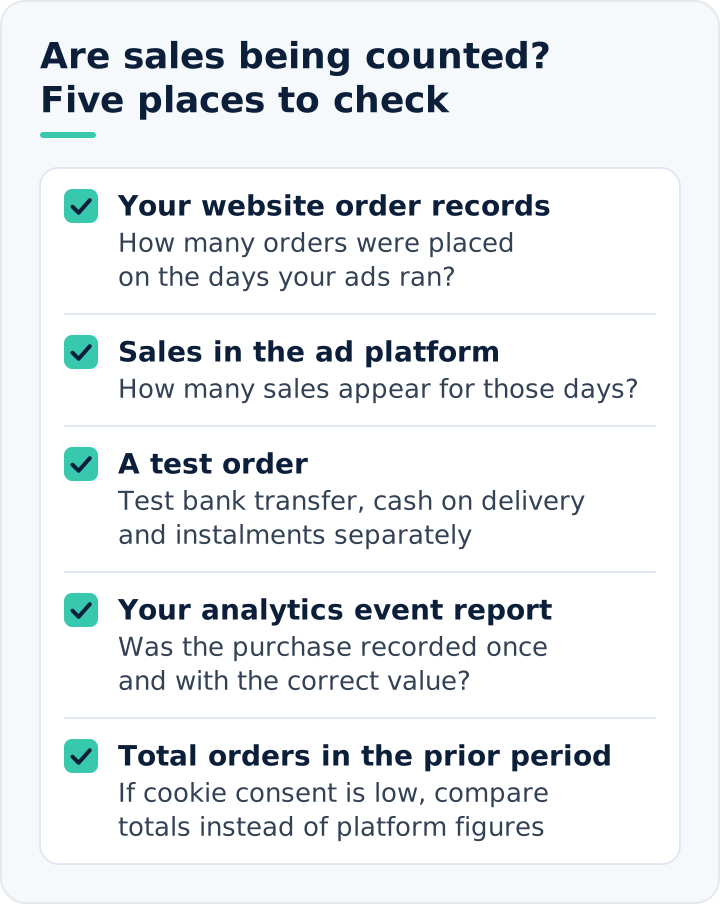
The first question is: when the ad dashboard shows zero sales, do your website’s order records also show zero? If they differ, the problem is tracking, not marketing. The purchase event may not fire, may fire on the wrong page, or may fail to send the order value.
The check takes ten minutes. Click your own ad, place a small test order, and verify that it appears in the ad platform and analytics tool. Test bank transfer, cash on delivery, and installment options separately; a sale may not be counted if the customer does not return to the site from the payment provider's page.
Cookie consent affects results too. If many visitors decline, the dashboard sees only some actual sales. Rather than treating it as the sole source, compare total orders during advertising days with the previous period.
Below are five measurement checks and the answer to look for in each.
Who Is Clicking? Check Click Quality
If measurement is correct, the next question is whether the person clicking is a genuine potential buyer. A cheap click is not always a good click; an unusually cheap one is often a warning. What you need is qualified traffic, not click volume: visitors actively seeking your product with an intent to buy.
In search advertising
Open the search terms report to see which searches trigger your ads. If searches such as “free,” “how to,” “second-hand,” or terms describing an entirely different product dominate, your budget is reaching people without purchase intent. Every click from these searches is wasted ad spend. Add these terms as negative keywords and narrow your broad matching.
In social media advertising
Check which placements generate clicks. In-app networks and gaming placements can produce many low-quality, often accidental clicks. The campaign objective also matters: a traffic objective tells the platform to find people who click, and it finds the cheapest clickers. If you want sales, optimize for purchases, which requires the tracking described in the first point to work.
Time on site and exit rate provide a quick answer. If most visitors leave within seconds, either the wrong people are arriving or the page loads too slowly.
Causes Related to Campaign Setup
Even with the right audience and placements, campaign structure can hold sales back. The most common issue we see is a small budget split across too many campaigns and ad sets. Advertising platforms learn who is likely to buy from past sales; an ad set that cannot generate even one or two sales a day cannot complete that learning and distributes the budget without enough guidance. With a small budget, simplifying the structure by consolidating it into fewer campaigns produces healthier results.
The second issue is frequent changes. A campaign whose budget, targeting or creative is adjusted daily keeps restarting its learning process. After a change, wait a few days to see its effect.
The third case is newly opened ad accounts. If neither the account nor the website has any sales history, the platform has no starting point. Fluctuating results in the first weeks are therefore normal; evaluate performance after this initial period.
Do the Ad and Landing Page Say the Same Thing?
Visitors expect to find what the ad showed. An ad for a specific product should link directly to that product, not the homepage or a broad category. If an ad announces a discount, the same offer should be visible in the page's first screen.
Common forms of mismatch include:
- The ad price differs from the page price: the promotion has ended, but the ad is still running.
- The ad shows one product, but the click lands on a list of hundreds, forcing visitors to search for what they wanted.
- The ad’s language and imagery address one audience, while the page’s message addresses another.
- The advertised product size or color is out of stock.
The easiest way to check is to click your own ad on your phone. If the page does not communicate “I am in the right place” within three seconds, visitors will go back.
What Stops Visitors on the Page
If the right person reaches the right page but does not buy, something on the page is holding them back. Common causes follow.
- Speed: if a page loads slowly over mobile data, visitors leave. Large images and excessive plugins are the most common causes.
- Total cost shown too late: if shipping costs appear only at checkout, carts are abandoned there. Show shipping information on product pages.
- Lack of trust: if returns, delivery times, contact details and reviews are not visible, first-time visitors may hesitate to pay.
- Checkout: mandatory registration, long forms or missing payment options can lose the sale at the final step.
- Insufficient product information: customers cannot decide without size charts, dimensions, materials and real usage photos.
If your platform cannot support these fixes, more ad budget will not solve the problem. Address the website first. In our e-commerce website setup service, speed, checkout and product-page layout are among the first areas we review in this service.
Read the Funnel Step by Step
Instead of guessing, identify where visitors drop out. Compare four figures in analytics: product views, add-to-carts, checkout starts and purchases. These form the purchase or conversion funnel. Each stage is smaller than the previous one; look for an unusually large drop between stages.
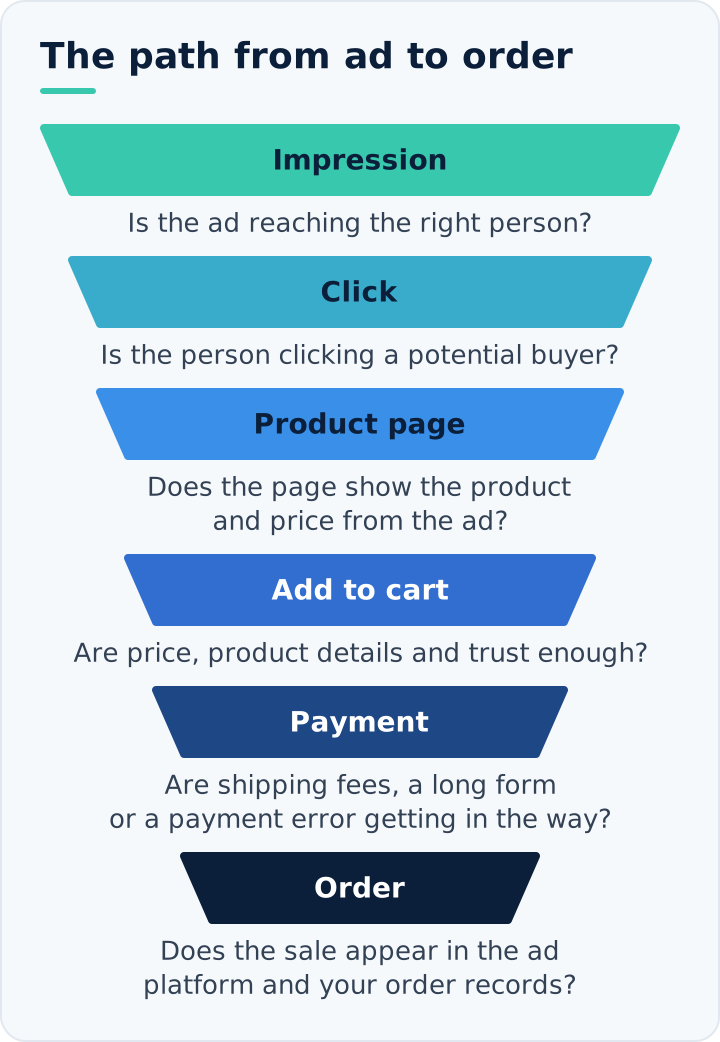
For example, suppose 1,000 ad visitors produce 900 product page views,20 add-to-carts,8 checkout starts and 2 purchases. The largest drop-off is between viewing the product and adding it to the cart. The likely issues are price, product information or the wrong audience. If 150 of those same 1,000 visitors added to their cart but only 2 purchased, the problem would instead lie at checkout or in shipping costs.
Each step points to a different fix:
- If many visitors view the page without adding to cart: price, product description, images and targeting.
- Many add to cart but do not proceed to checkout: check shipping costs, minimum order value and surprises on the cart page.
- If many people start checkout but do not finish: form length, payment options and technical errors.
We explain how these steps are measured, and why they should be tracked alongside advertising in the same report, in our article What Is Performance Marketing?
Separate New and Returning Visitors
People rarely buy on their first visit. Most view a product, leave, compare other websites and return days later. Judging advertising only by first-click sales can make a working campaign look unsuccessful.
Compare purchase rates for new and returning visitors separately in your analytics tool. If returning visitors convert substantially better, the ad that brought the first click is worth more than the dashboard suggests. Rather than switching it off, add a remarketing campaign that reminds visitors who have not purchased.
As product prices rise, decision times grow longer. A product costing a few hundred lira may be bought the same day; for one costing several thousand, customers often return two or three times. Set your evaluation window according to your product's decision cycle.
The Issue May Not Be Marketing: Offer and Price
Sometimes everything is configured correctly but orders still do not arrive because the offer is weaker than competitors'. Customers usually compare several websites before buying. If the same product is cheaper elsewhere, ships free or arrives sooner, your ad may simply send customers to a competitor.
The check is simple: search for your product and compare your price, shipping terms and delivery time with the first few results. If you cannot close the gap, shift advertising towards less price-sensitive offers: unique products, bundles or the service itself.
For a new product or brand, demand itself is a question. Even excellent advertising cannot sell something nobody searches for or needs.
When Is the Ad Itself the Problem?
We left advertising until last because it is often not the culprit. Still, two situations call for reviewing the ads. First, if the click-through rate is very low and cost per click is high, the ad is not engaging its audience; the problem begins before the sale. Second, if the ad misrepresents the product, it may attract clicks but disappoint visitors on the page. Exaggerated promises, images that do not show the real product, and headlines implying that “everything is free” increase clicks while reducing sales.
A good ad filters out people who will not buy. Stating the price or who the product suits may reduce clicks but increases the likelihood that visitors will purchase. Fewer clicks in this case are not a problem; they indicate that the budget is reaching the right people.
How Much Data Do You Need to Decide?
Deciding too early is the most common mistake. It is normal for only one or two out of a hundred e-commerce visitors to buy. The ratio of buyers to visitors is the conversion rate. Getting fifty clicks and declaring “there are no sales” is like tossing a coin twice and drawing a conclusion from the result.
Use your historical data: how many orders does your site normally receive per hundred visitors? At one percent, you need at least several hundred clicks to assess a campaign. If the budget cannot buy that many, track a more frequent step such as add-to-cart; it is the only useful directional measure with limited data.
There is also a limit to waiting. If several hundred qualified clicks have not produced even an add-to-cart event, you have enough data; return to the steps above instead of spending more.
Review Sequence
- Place a test order and confirm it appears in the dashboard. If it does not, fix measurement first.
- Review search terms and placements, then exclude irrelevant clicks.
- Confirm that the campaign objective is purchases.
- Click the ad on your phone: does the page show the advertised product, price, and offer?
- Read the funnel, identify the biggest drop-off and fix only that step.
- Compare your prices and shipping terms with competitors.
- Wait until enough data accumulates after a change, then reassess.
You can also run these checks from the symptom outward. The table below brings together the likely cause, the report to open and the action to take for each sign seen in the dashboard or analytics tool.
| Symptom | Possible cause | Report to check | Action to take |
|---|---|---|---|
| Orders exist on the site, but no sales or value in the dashboard | The purchase event fails or the value is not passed | Order records and the dashboard's sales column | Test and fix the event with a test order; try every payment method. |
| Clicks are cheap, but visitors leave immediately | Irrelevant searches or low-quality placements | Search terms report and placement breakdown | Add negative keywords and exclude weak placements |
| Many clicks, almost no add-to-carts | The campaign was set up for traffic | Campaign objective and optimization settings | Set up the campaign for the purchase event |
| Visitors leave the landing page immediately | The advertised product, price or offer is missing from the page | Landing page report and your own mobile test click | Direct the ad to the correct product page; make sure the price and offer match |
| Mobile visitors leave much faster | The page loads slowly on mobile | Device breakdown and mobile speed test | Compress images and remove unnecessary plugins |
| Products are viewed but not added to cart | Price, missing product details or the wrong audience | Funnel report and competitor price and shipping comparison | Complete product details; review pricing and audience |
| Products are added to cart, but checkout is not completed | Late shipping fees, mandatory registration or payment errors | Checkout funnel report and a test purchase | Show shipping on the product page and simplify checkout |
| Sales happen days later, not on the first visit | The product has a long decision cycle | New versus returning visitor comparison | Add remarketing and extend the evaluation period |
Change one thing at a time. If you change the ad, page and price on the same day, you cannot know which helped even when results improve. To enter the next campaign period with these checks completed, our Black Friday preparation plan divides the same steps across weeks. If you are looking for a team that addresses advertising, the page and tracking together, our performance marketing service is built around managing all three together.
FAQs About Ads That Don't Generate Sales
Why does Google Ads get clicks but no sales?
The cause is often that ads are shown for searches with no purchase intent or across networks other than search. The main sources of this problem include leaving the Display Network enabled in a Search campaign, choosing a location setting that also includes people interested in the target area but not present there, and using broad match in an account with no conversion data. After confirming that conversion tracking works, check the campaign settings first, then the search terms report.
When should I stop an ad that generates no sales?
After confirming that measurement works correctly, pause when spend reaches two or three times your allowable cost per order without a single sale. Rather than stopping the entire campaign, first pause the ad or ad set that is not generating sales, preserving the data accumulated by the parts that work. A pause decision based on faulty measurement may stop an ad that is actually producing sales.
Why does Meta show many clicks but few website visits?
Meta’s all clicks column counts every click on an ad, not just those leading to your website: likes, profile visits and expanding an image are included. Link clicks show visits directed to the site, while landing page views show pages that actually opened. If link clicks are high but landing page views are low, the page may load slowly, some clicks may be accidental, or the Meta pixel may not be working on the landing page.
What should an e-commerce conversion rate be?
There is no single correct rate. It varies by product, price, and traffic source, so your own site's history is the most reliable benchmark. Track the rate separately by source: people searching for your brand by name usually buy at a much higher rate than those seeing you on social media for the first time. Comparing every channel with one average unfairly makes campaigns reaching unfamiliar audiences look unsuccessful.
Will increasing the ad budget help if there are no sales?
Usually not. If one stage of the funnel is losing customers, more budget amplifies the same loss. The main exception is when the budget is too small for the campaign to learn; then the issue is the amount itself rather than the funnel. If you do decide to increase it, use small increments a few days apart instead of doubling it at once, because sudden increases force the system to relearn.